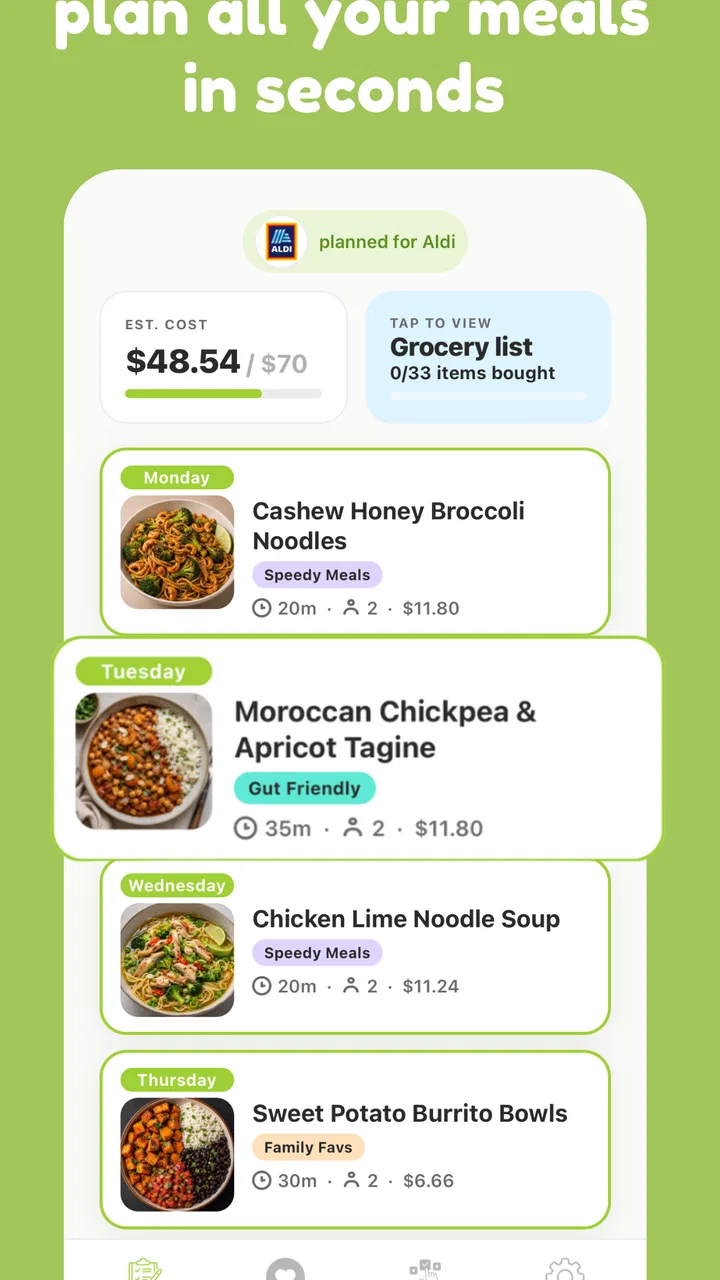
mise - meal planner
- 4.8
- Rating
- 50.00K
- Installs
- Free
- Price

 Analysis by App-foxy
I tried mise as a practical answer to a very ordinary problem: deciding what to eat before I am already hungry and too tired to think. It is a free meal-planning app from Tegs Labs Ltd, aimed at turning the vague question of “what should I make?” into a more manageable routine. The basic appeal is immediate. Instead of opening a general recipe site, scrolling through unrelated dishes, and then trying to remember what I planned, I can use a food-focused space built around choosing meals.
That sounds simple, but simplicity is exactly what makes this kind of app either useful or disposable. A meal planner has to do more than show attractive food ideas during the first few days. It needs to reduce decision fatigue, fit around real shopping and cooking habits, and remain easy enough that I will still open it after the novelty disappears. My experience with mise is that it has a promising first-week rhythm and a clear purpose, but its long-term value depends heavily on whether I am willing to keep my own planning habits consistent.
What using mise feels like after the first few days
The strongest early impression is that mise gives meal planning a defined starting point. I do not have to begin with a blank document or build a complicated spreadsheet. I can approach the app when I want ideas, browse with a particular meal in mind, or use it as a prompt when my usual rotation has become boring. That makes it especially approachable for someone who wants more structure but does not want to learn a full household-management system.
You May Also Like

 AccuWeather: Weather Radar
AccuWeather Review: A Quick, Clear Forecast for Everyday Decisions
For everyday plans, the best forecast is the one you can understand quickly. AccuWeather makes rain timing, radar, and local conditions easy to act on, with a few trade-offs.

 Hill Climb Racing
Why Hill Climb Racing Still Turns Crashes Into One More Run
A tiny car, a bumpy hill and one more upgrade: Hill Climb Racing keeps resurfacing because its simple chaos makes every near-miss feel personal.

 AliExpress - Shopping App
AliExpress Makes Global Shopping Feel Personal, but Shoppers Bear the Risk
AliExpress turns a global marketplace into a pocket-sized discovery engine. Its reach is useful, its shopping loop compelling, and its trade-offs easy to miss.

 Lords Mobile: Kingdom Wars
Lords Mobile Is a Kingdom-Building Routine, Not a Quick Match
A case-by-case verdict on the building, battles, device demands, and social commitments that make Lords Mobile rewarding for some players and exhausting for others.

 PDF Scanner app - TapScanner
TapScanner Makes Paperwork Easier to Capture, Check, and Share
TapScanner makes scanning with a phone feel less like a rescue operation and more like a dependable step in getting work done. Its capture tools are useful, though not flawless.

 Block Blast!
 Shows How Much a Puzzle Game Can Leave Out
A quiet grid game shows why puzzle players increasingly value instant clarity, repeatable skill and low-pressure play—and where the genre still needs to catch up.
More From Our News Desk
View All News


In the first week, the app is most enjoyable when I treat it as a decision helper rather than a strict diet coach. I can look for inspiration, choose meals that match the kind of week I expect to have, and avoid making every evening a separate research project. The difference is small but meaningful: planning becomes a short selection task instead of an endless search across websites, videos, saved posts, and notes.
I also found that the app works best when I make plans according to energy, not just taste. A useful week is rarely made entirely of ambitious recipes. I would rather place a quick and familiar meal beside something more interesting, then leave room for a night when cooking is unlikely. This is one of the less obvious ways to get more from mise: use the planner to manage effort as well as food. A beautiful meal idea is not helpful if it lands on the busiest evening of the week.
For a couple or a small household, this can make conversations about dinner more concrete. Instead of asking an open-ended question and receiving “I don’t know,” I can present a short set of possibilities and make a decision. For one person, the benefit is different. The app can help prevent the repeated cycle of buying ingredients with good intentions, forgetting them, and ordering something else later.
The app is free to install, which makes trying that first routine relatively low-risk. There are in-app purchases ranging from around eleven dollars to forty dollars per item, so I would still pay attention to what is included before committing to anything beyond the free experience. The free entry point is useful for testing whether the planning style suits me, but the presence of purchases means I would not assume every useful part of the experience is available without spending.
Who gets the quickest benefit
I think mise is best suited to people who already want to cook at home but struggle with choosing meals. That includes someone moving away from spontaneous takeout, a parent trying to make weekday dinners less chaotic, or a beginner who wants ideas without designing an entire food system from scratch. It can also help an experienced home cook who is not short of recipes but is tired of deciding among them.
It is less convincing for someone who wants detailed nutrition tracking, strict macro targets, specialist dietary controls, or a highly automated grocery workflow. A dedicated nutrition app or a more advanced recipe-management tool may be a better fit in those cases. mise feels focused on meal ideas and planning, not on becoming the central database for every aspect of food management.
The age rating is Everyone, which matches the straightforward nature of the concept. It is also a relatively lightweight commitment from a device perspective, supporting Android versions from 8.0 onward. That broad compatibility makes it accessible on older phones, although the practical experience will still depend on the device and how comfortably I can browse and plan on its screen.
A realistic weeknight test
Imagine I finish work late on a Tuesday with a short amount of energy left. Without a plan, I might open several recipe sources, reject complicated options, and end up choosing food based only on speed. With mise, the useful workflow is to have already selected a small set of realistic meals earlier in the week. I can then use the app as a reminder of the decision rather than starting the decision from zero.
The important detail is that the app cannot rescue a plan that ignores the calendar. If I select meals based only on what looks appealing, Tuesday can still fail because the ingredients are missing or the preparation is too demanding. My practical tip is to plan backward from the week: reserve the more involved idea for a day with time, place an easy option after a busy day, and avoid filling every evening with a cooking obligation. The planner becomes more valuable when I use it to protect my energy.
Another useful approach is to keep one flexible slot. I would leave at least one meal choice open for leftovers, a change of schedule, or a sudden preference for something different. That prevents the app from turning into another source of guilt. A plan should reduce friction, not make me feel that a changed dinner is a failure.
Whether the routine survives beyond the novelty
The first-month question is not whether mise can provide appealing ideas. It is whether those ideas continue to influence what I actually cook. Most meal-planning tools have a honeymoon period: the user enjoys browsing, builds an ambitious plan, and then gradually stops opening the app because the plan feels like work. The lasting test is therefore maintenance. How much effort must I spend to keep the system useful?
mise has recurring value when I use it before the pressure point arrives. Opening it while I am calm and deciding on a few meals is far more effective than reaching for it at the exact moment I am hungry. This timing matters because browsing for inspiration can easily become procrastination. A five-minute planning habit is more sustainable than expecting the app to solve dinner every night in real time.
I would also avoid trying to plan too far ahead unless I genuinely enjoy doing that. A shorter planning horizon is often more realistic because schedules change, ingredients vary, and appetite is unpredictable. mise can serve as a weekly reset rather than a rigid calendar. That is a meaningful long-term use case: I return to it at a regular moment, make a manageable set of choices, and then stop thinking about dinner until I need to.
The app’s average rating is 4.6 from roughly a thousand ratings, with a few dozen written reviews, and it has passed ten thousand installs. Those figures suggest that the concept is resonating with an existing group of users, while also indicating that it remains a relatively small product rather than an unavoidable mainstream platform. I read that as a reason to judge it by personal usefulness, not by popularity alone.
How it compares with familiar alternatives
The usual alternative is not another meal planner. It is a mixture of search engines, social media saves, recipe websites, notes apps, and memory. Those sources may offer more variety, but they scatter the planning process. I can save dozens of dishes and still have no answer when I need to decide what to cook tonight. mise earns its place by narrowing the gap between discovering a meal idea and actually organizing it into a plan.
A notes app remains better for people who already have a dependable personal recipe collection. It is faster to write “pasta, soup, leftovers” than to open a dedicated planner, and it gives complete control over formatting. The trade-off is that notes do not naturally provide the same feeling of guided discovery. If I need inspiration more than storage, mise has the more useful starting point.
Recipe websites are stronger when I need detailed cooking instructions, substitutions, technique explanations, or a very specific dish. I would still use those sources when I have chosen a meal and need to cook it accurately. mise is more valuable earlier in the process, when the problem is deciding what belongs on the menu. In practice, the two approaches can complement each other: use the planner to make the decision, then use a trusted recipe source when execution requires more detail.
Large food platforms may offer broader tools, such as shopping lists, pantry records, nutrition information, or household sharing. If those functions are central to my routine, a more comprehensive service may justify its extra complexity. mise is appealing precisely because it does not ask me to turn meal planning into a second job. That focus is a strength for some people and a limitation for others.
Where the maintenance starts to show
The main burden is not learning the app. It is maintaining the habit around it. I still have to decide how ambitious I want to be, notice what ingredients are available, account for leftovers, and adjust when plans change. No meal planner can remove those real-world variables. The app can make the choice cleaner, but it cannot shop, cook, or prevent an unexpectedly exhausting day.
There is also a risk of repetition. If I use the same small set of comfortable meals, the app may become a confirmation tool rather than a source of discovery. That is not necessarily bad; dependable meals are valuable. But anyone expecting constant novelty may eventually feel that the planning routine is more administrative than exciting. My solution would be to introduce one unfamiliar idea at a time instead of rebuilding the whole menu around novelty.
Another source of fatigue is overplanning. A full schedule can look satisfying inside an app while feeling restrictive in real life. I prefer choosing the meals that matter most and leaving the rest flexible. This is a concrete trade-off: more planning can reduce daily decisions, but too much planning increases the chance that one missed meal makes the entire system feel broken.
In-app purchases are another consideration for long-term use. Since individual purchases can cost around eleven to forty dollars, I would evaluate them based on repeated usefulness rather than curiosity. A feature or content option that helps me plan every week could be worthwhile; something I use once during the initial browsing phase would be harder to justify. The free version is best treated as a trial of the workflow, not as proof that every future need will remain free.
Small habits that make it more sustainable
I found three habits particularly useful. First, I would plan around preparation effort, not just categories such as breakfast or dinner. Marking mentally which meals are easy, moderate, or demanding helps prevent a promising plan from colliding with a busy schedule. Even if the app does not do that classification for me, I can apply it while choosing ideas.
Second, I would review the plan before shopping rather than after. That gives me a chance to remove meals that depend on ingredients I will not realistically use and to notice overlaps between dishes. The goal is not perfect optimization. It is avoiding a plan that looks varied but creates unnecessary waste or too many separate purchases.
Third, I would use the app as a reset after a failed week. If I miss several planned meals, I would not abandon the routine or try to compensate with an even stricter schedule. I would select fewer, easier options and start again. This matters because the lasting value of a planning tool comes from recovery. A system that only works during an organized week is not really helping with ordinary life.
The current version is 1.0.61, and the product is developed by Tegs Labs Ltd. Those details are useful when checking compatibility and deciding whether the app fits my phone, but they do not change the central judgement: the experience succeeds or fails based on whether its planning flow feels lighter than the alternatives I already use.
My long-term verdict on keeping mise installed
After the initial excitement fades, I would keep mise installed if my main problem is meal indecision. Its best quality is not that it makes food magically easier; it gives the decision a home. That small amount of structure can be enough to reduce last-minute choices, make home cooking feel more intentional, and give a household a shared starting point for discussing meals.
I would not recommend it as the only food app for someone who needs a complete nutrition, pantry, shopping, and recipe-management system. I would also skip it if I already have a reliable personal menu and rarely need new ideas. In those situations, a simple note, calendar, or specialized tool may be faster and more appropriate.
For everyone in between, the sensible approach is to test the habit rather than merely browse the content. Use it before the week begins, choose a realistic number of meals, leave room for change, and notice whether the next few evenings require less mental effort. If that reduction is real, the app has earned a place on the phone. If I only open it for attractive inspiration and never let it affect shopping or cooking, the novelty will not last.
My final view is cautiously positive. mise is a focused Food & Drink app with a clear everyday purpose, a free starting point, and enough flexibility to help people who want ideas without adopting an elaborate system. Its lasting strength is making meal decisions easier to repeat, not promising to manage every part of eating. The app earns recurring value when I use it lightly and consistently; it becomes tiring when I expect it to replace planning judgement altogether.
In short, I would recommend it to a friend who says, “I want to cook more, but I never know what to make.” I would explain that the real benefit appears after the first week, when the app becomes part of a small routine rather than an entertainment feed. If that routine fits, mise can remain a useful companion for monthly meal planning. If it does not, the app is easy enough to leave behind in favor of a simpler note or a more comprehensive food-management alternative.
FAQs for mise - meal planner
01What is mise - meal planner, and who is it designed for?
mise - meal planner is a meal organization app designed to help you plan what to cook, manage recipes, and approach weekly meals with less stress. It can be useful for busy individuals, couples, and families who want more structure without creating a complicated schedule. The app is especially helpful if you often repeat meals, forget ingredients, or need a clearer overview of what to prepare.
02Can I create a weekly meal plan with my own recipes?
Yes, mise - meal planner is intended to support personalized meal planning rather than forcing you to follow a fixed menu. You can generally organize meals according to your routine, add recipes you already use, and adjust plans when your schedule changes. This makes it practical for people with different cooking habits, dietary preferences, or limited time on particular days of the week.
03Does mise - meal planner automatically create a grocery list?
One of the most useful reasons to use a meal-planning app is reducing the work involved in preparing a shopping list. mise can help connect planned meals with the ingredients you need, making it easier to review what should be purchased before going to the store. However, you should still check quantities and pantry items manually, since ingredient names, serving sizes, and substitutions may require personal adjustments.
04Is mise - meal planner suitable for special diets or dietary restrictions?
The app can be used to organize meals around many personal preferences, including vegetarian cooking, healthier routines, allergies, or specific nutritional goals, provided that you choose and enter appropriate recipes. It should not be treated as a medical nutrition service, and users with serious allergies or health conditions should verify every ingredient themselves. Always review recipes carefully and consult a qualified professional when dietary advice is medically important.
05Is mise - meal planner free to download, and does it require an account?
Before downloading, check the current App Store or Google Play listing because availability, pricing, subscriptions, and account requirements can change between versions and platforms. Some features may be accessible without payment, while advanced tools could require a premium plan. It is also worth reviewing the privacy details and permissions requested during setup, particularly if you prefer to keep meal plans, recipes, or personal information stored locally.
Pros
- Creates organized weekly meal plans in just a few taps.
- Helps reduce food waste by planning meals around selected recipes.
- Shopping lists make grocery trips easier and more structured.
- Useful recipe suggestions support healthier eating routines.
- Clean interface makes meal planning simple for beginners.
Cons
- Some recipes or features may require a paid subscription.
- Meal suggestions may not suit every dietary restriction or preference.
- The recipe database can feel limited in certain cuisines.
- Changing plans frequently may require extra manual adjustments.
- Grocery list accuracy depends on the recipe information provided.

mise - meal planner
Gallery